

Patent flowchart maker
Turn a method claim or a paragraph of your description into a filing-style flowchart you edit box by box.
5 free credits — about 1–2 complete drawings · no card
Example text
Your text is used only to make your drawings. A free preview carries a preview mark; nothing can be downloaded without an account.
What a filing flowchart needs
A method figure is judged on the printed sheet. These are the points 37 CFR 1.84 sets.
- One box per step
- Each step becomes its own box with your wording, numbered S100, S102… or 100, 102…, following the order your description sets out. In the plain style each figure starts a new hundred, so FIG. 2 runs from 200.
- Black solid lines
- 37 CFR 1.84(a)(1) asks for black lines that reproduce cleanly. Outlines, arrows and lettering are solid black on white at one line weight, with no color and no gray fill.
- Lettering at least 0.32 cm
- Capital letters and numerals are at least 0.32 cm tall on the final sheet (we measure capitals), the minimum in 37 CFR 1.84(p)(3). Tight fits are spaced out; the sheet is never shrunk below it at export.
- Margins
- 37 CFR 1.84(g): at least 2.5 cm at the top and left, 1.5 cm at the right and 1 cm at the bottom. Nothing crosses them.
- FIG. label and sheet number
- Each view carries its own “FIG. 1”, “FIG. 2” label below the drawing (1.84(u)). Figures over several sheets are numbered “1/3”, “2/3” at the middle of the top (1.84(t)).
- Reference numerals
- Step numerals such as S300 sit inside the box and must match your description. The cross-check lists numerals that appear on one side only, are duplicated, or name two different things.
Automatic checks cover what can be measured on the sheet. Whether the figure shows every claimed step remains the filer’s judgment.
From method text to FIG. 1
Paste the method text
A method claim, a paragraph of the detailed description, or a list of steps, up to about 3,000 words. Choose flowchart and the numbering series your application uses.
Get a laid-out figure
Each box is labelled with your wording. Every box is tied to a source sentence. When your text gives no numeral, the engine assigns one and the cross-check lists it; anything not found in your text is flagged.
Edit and export
Click a box to change its words or numeral; only that box moves. Export US Letter or A4 PDF sheets, SVG or 300 dpi PNG. Editing never uses a credit.
Method claims read as a sequence of steps, which is what a flowchart shows; system claims read as parts that talk to each other. Many applications use both, with FIG. 1 for the system and FIG. 2 for the method. PatentQuill draws both from the same specification — see patent block diagrams for the system side. If you are weighing general diagramming tools, the comparison of Visio, PowerPoint and draw.io for patent drawings explains where they stop short of the sheet rules.
From quoted passage to FIG. to export
One sample, start to finish: the passage below is the verbatim text given to PatentQuill, and the figure beside it is what the current engine drew.
Host registration process · US 7,818,399 B1, FIG. 4
1. Quoted source text (verbatim input)
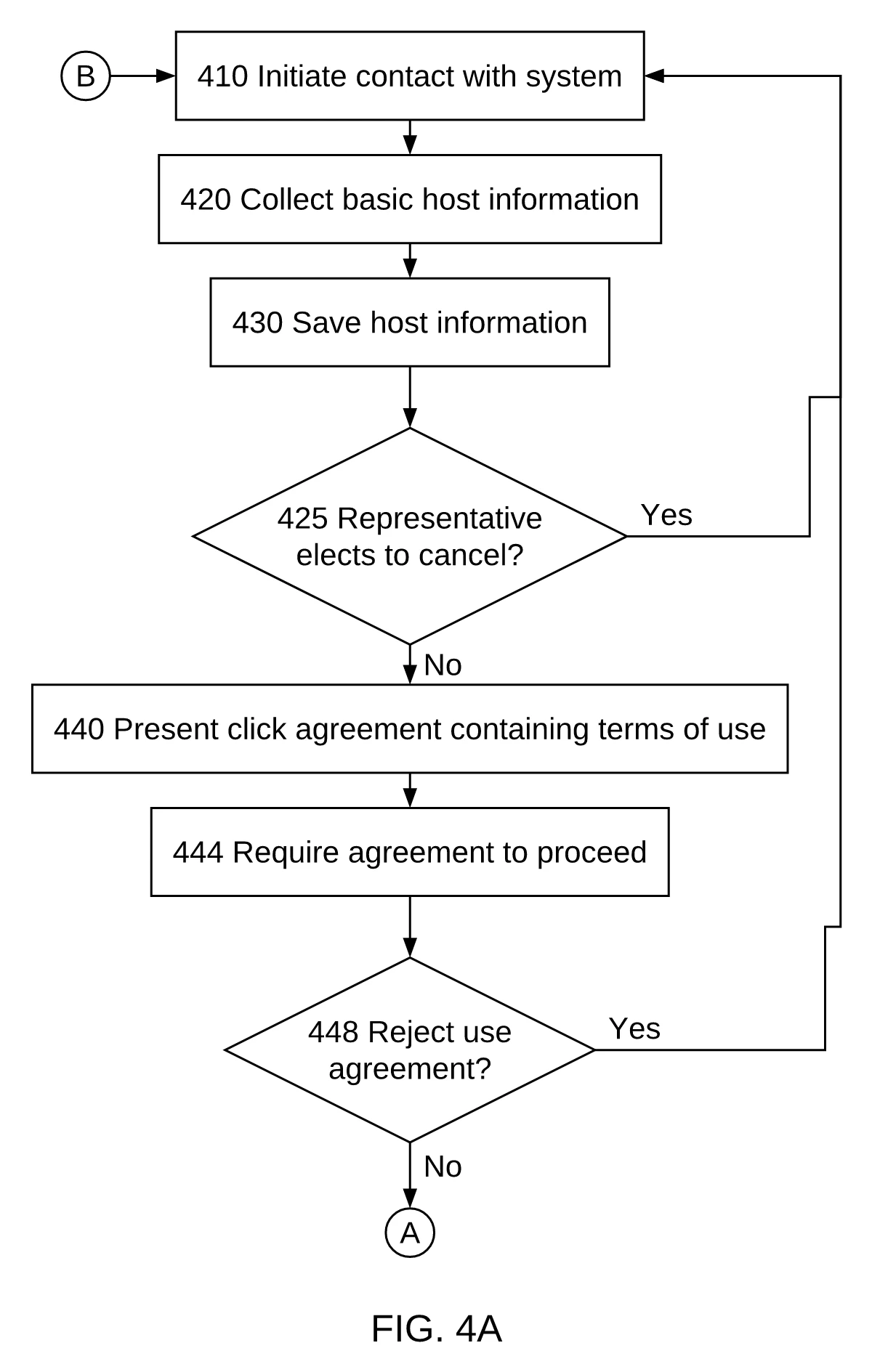
For a host to gain access to the host manager system, the host must be registered. FIG. 4 depicts a flow chart for a typical registration process. A host representative may initiate contact 410 with the system via a web interface. The signup process must collect basic host information 420, including the information necessary to pay the host a commission for purchases through his site, which is saved by the system 430. Optionally, a click agreement containing terms of use 440 may be presented requiring agreement 444 to proceed. If at some point the representative elects to cancel 425, 458 or reject the use agreement 448, he or she is returned to her point of entry 410. The system may then request the representative to select a user identification and a password 450. If the selected user identification is already in use 454, the representative may be prompted to select a user identification 450. The information associated with the host is stored 460, and the representative may proceed to the host manager system page 470.
US 7,818,399 B1, detailed description, the passage describing the host registration flow chart of FIG. 4 (one contiguous paragraph)
2. Generated by PatentQuill
3. Editing and export
Click a box to change its words; only that box moves. Export PDF, SVG or PNG.
The exported sheet carries the same drawing shown in column 2. The samples on this page are shown as generated, with no edits.
Source: US 7,818,399 B1, FIG. 4. US 7,818,399 B1, detailed description, the passage describing the host registration flow chart of FIG. 4 (one contiguous paragraph). Generated by PatentQuill from the quoted public patent text; unedited.
Sheet check: all 12 rules passed (37 CFR 1.84 measurable rules).
How it differs from the official figure: Two-sheet output: only sheet 1 (FIG. 4A) of two is shown; the engine split the long flow across FIG. 4A and FIG. 4B, whereas the official FIG. 4 is one figure. The positions of decisions 425 and 448 differ from the official branch structure, and the off-page connectors A and B are the engine's own continuation markers between its two pages. Cross-check reported 2 errors (names of steps 444 and 460 differ from the wording in the text) and several warnings (inferred edges, optional steps); compliance checks all passed.
One more real flowchart from public patent text
One more figure, generated from a paragraph of a published US patent and set beside the patent’s own figure. It differs from the original, and the note says how. Two flowchart samples in all; others we tried did not match their originals closely enough to show. PatentQuill does not provide legal advice; check every figure against the official source before filing.
Advertiser login procedure · US 6,269,361 B1, FIG. 3
1. Quoted source text (verbatim input)
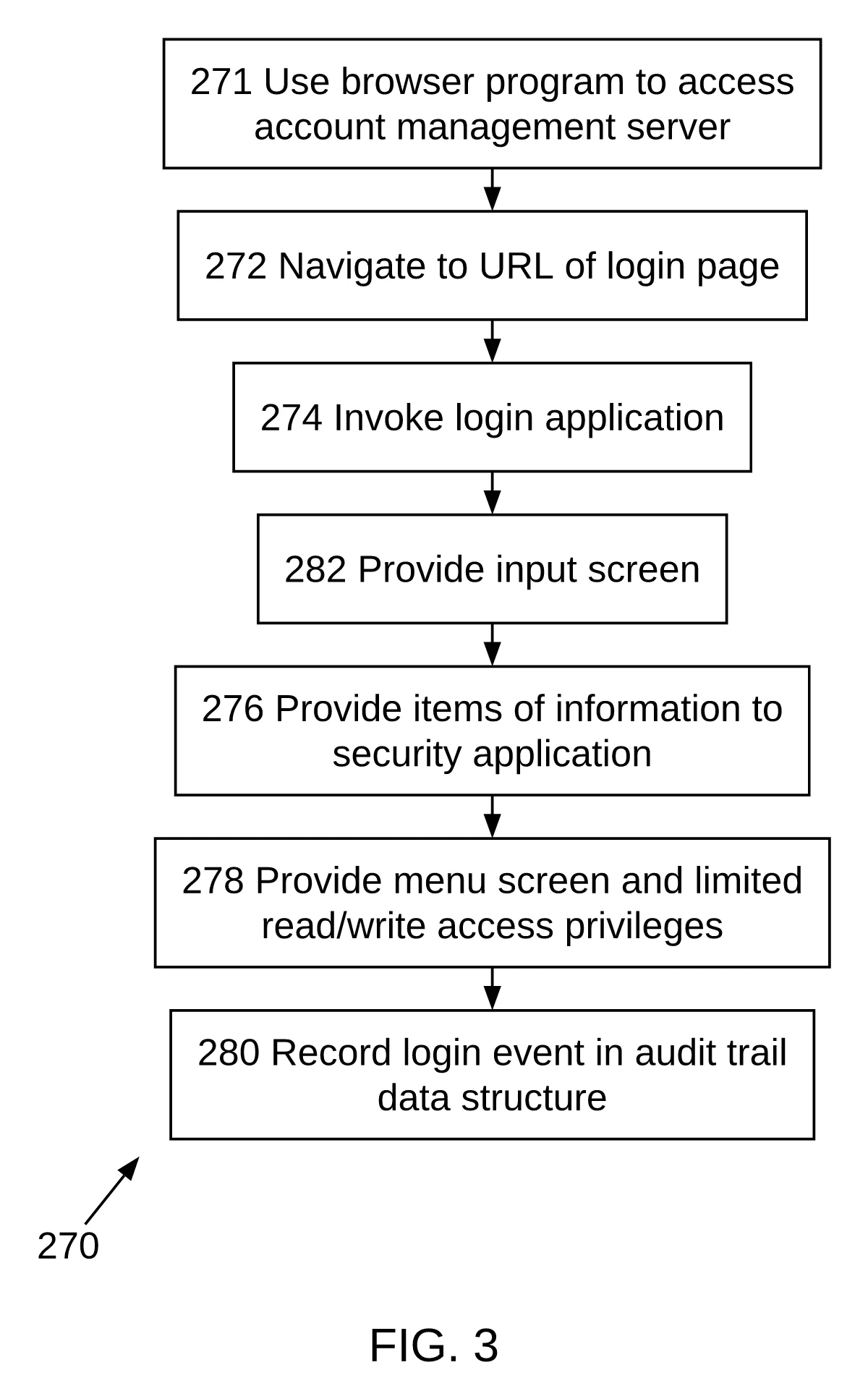
The login procedure of the preferred embodiment of the present invention is shown in FIGS. 3 and 4 for two types of user. FIG. 3 shows the login procedures 270 for an advertiser. FIG. 4 shows the login procedures 290 for an administrator managing and maintaining the system and method of the present invention. As discussed above, the advertiser or administrator at a client computer 12 must first use a browser program at steps 271 or 291 to access the account management server. After the advertiser navigates to the URL of the login page to start the login process at step 272 or 292, the processing system 34 of the account management server 22 invokes a login application at steps 274 or 294. According to this application, the processor provides an input screen 110 (FIG. 2) that requests the advertiser's or administrator's user name and password. These items of information are provided at steps 276 or 296 to a security application known in the art for the purpose of authentication, based on the account information stored in a database stored in storage 32 of account management server 22.
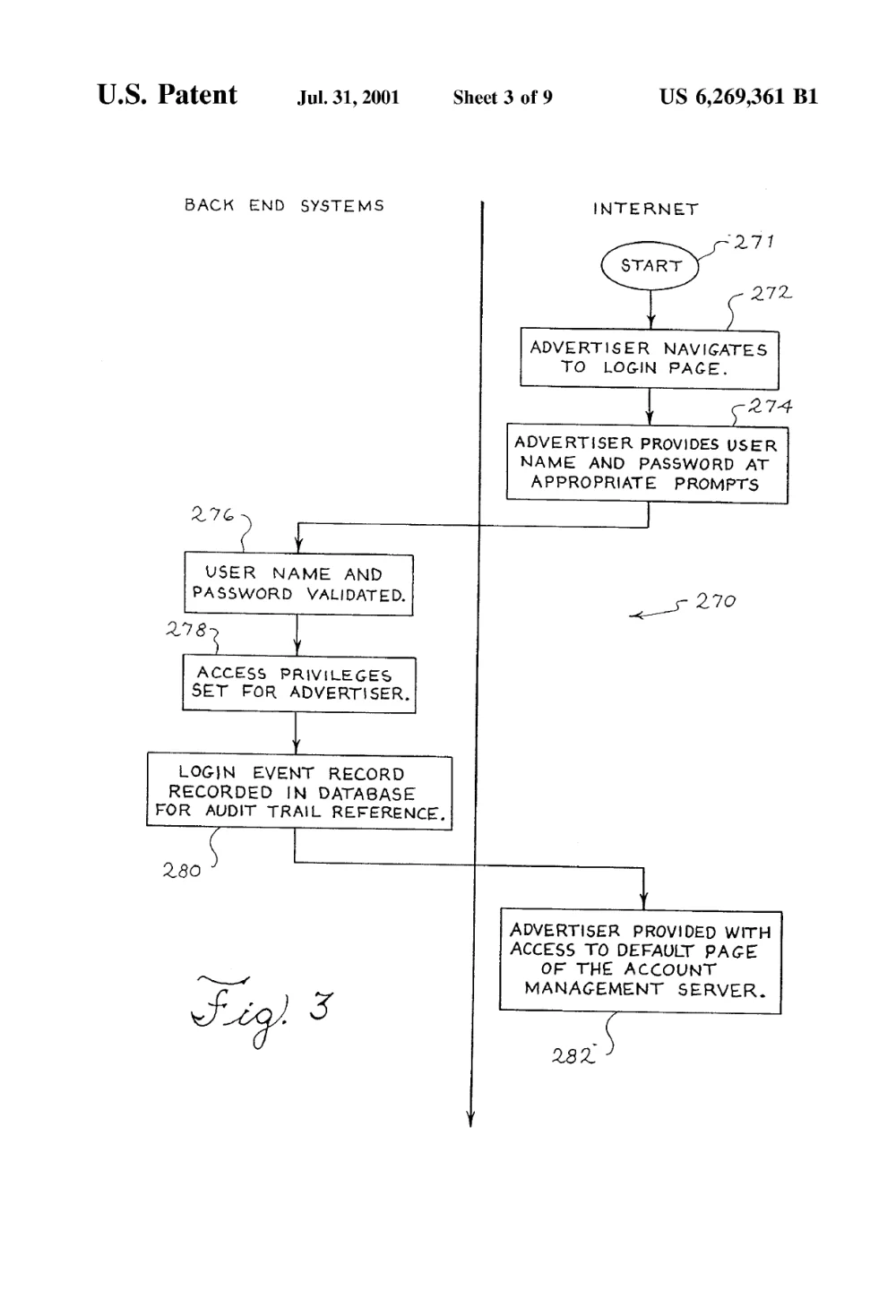
According to FIG. 3, after the user has been authenticated as an advertiser, the advertiser is provided with the menu screen 120 of FIG. 2 and limited read/write access privileges only to the corresponding advertiser account, as shown in step 278. The advertiser login event 278 may also be recorded in step 280 in an audit trail data structure as part of the advertiser's account record in the database. The audit trail is preferably implemented as a series of entries in database 38, where each entry corresponds to an event wherein the advertiser's account record is accessed. Preferably, the audit trail information for an account record may be viewed by the account owner and other appropriate administrators.
US 6,269,361 B1, detailed description, two contiguous paragraphs describing the login procedures of FIGS. 3 and 4
2. Generated by PatentQuill
3. Official figure in the patent (FIG. 3)
Source: US 6,269,361 B1, FIG. 3. US 6,269,361 B1, detailed description, two contiguous paragraphs describing the login procedures of FIGS. 3 and 4. Generated by PatentQuill from the quoted public patent text; unedited.
Sheet check: all 12 rules passed (37 CFR 1.84 measurable rules).
How it differs from the official figure: Sheet 1 of 2 (FIG. 3; FIG. 4 was also generated on sheet 2 and is not shown). The engine assigned numeral 282 to "Provide input screen" because the text only says "input screen 110"; the official FIG. 3 uses 282 for a different step, so the number is the engine's own and cross-check warns it is not in the text. It also reports a name mismatch for 278. Compliance checks all passed.
Questions
What counts as a patent flowchart?
A figure that shows the steps of a method in order, each in its own box with arrows between them, numbered so the description can refer to individual steps. It is the usual figure for software and other process claims.
Can I keep my own step numbers?
Yes. Choose S100 numbering (S100, S102…) or plain numerals numbered by figure (FIG. 1 from 100, FIG. 2 from 200). Numbers are drawn in the box and checked against the numerals in your text, so a step renamed in one place is reported in both.
Will it add steps my description does not contain?
It should not, and it tells you when it does. Every box is tied to a source sentence. When your text gives no numeral, the engine assigns one and the cross-check lists it; anything not found in your text is flagged. You can fix or remove anything flagged before export.
What can I try for free?
5 free credits when you sign in with Google, with the full editor and numeral check. Free exports carry a watermark; paid credits export clean sheets without a watermark and a cross-check report. Paid drawings start from $0.33 per drawing — see pricing.
Are the drawings accepted by the USPTO?
Sheets are produced to the measurable requirements of 37 CFR 1.84 (margins, letter height, black solid lines, figure labels, sheet numbers) and checked before export. Acceptance also depends on content, such as showing every claimed step, which stays your call.
The free patent drawing checker measures margins, letter height, FIG. labels and sheet numbers on the sheets you plan to file. More on the home page. If you are weighing tools, the patent drawing software comparison covers dedicated drafting apps and when a draftsperson is the better choice.
Draw the method figure
Paste a method description and export a first sheet. 5 free credits when you sign in with Google.