

Patent block diagram maker
Turn a system description into a filing-style block diagram, with modules and numerals taken from your own text.
5 free credits — about 1–2 complete drawings · no card
Example text
Your text is used only to make your drawings. A free preview carries a preview mark; nothing can be downloaded without an account.
What a filing block diagram needs
A system figure is read as a map of parts. These are the points 37 CFR 1.84 sets.
- One box per module
- Each module becomes its own box with your wording, numbered 100, 102… or the series your application already uses.
- Connections you can follow
- Lines join the boxes as your description describes, with arrowheads where flow has a direction.
- Numerals outside the box
- Reference numerals sit outside the block on a short lead line, the convention for block diagrams, so the numeral does not crowd the label. The cross-check reports numerals missing on one side, duplicated, or naming two different parts.
- Black solid lines
- 37 CFR 1.84(a)(1) asks for black lines that reproduce cleanly. Boxes, lead lines, arrowheads and lettering are solid black on white at one line weight, with no color and no gray fill.
- Lettering at least 0.32 cm
- Capital letters and numerals are at least 0.32 cm tall on the final sheet (we measure capitals), the minimum in 37 CFR 1.84(p)(3). A long module name is handled by the box, never by shrinking the sheet.
- Margins and FIG. labels
- At least 2.5 cm at the top and left, 1.5 cm at the right and 1 cm at the bottom (1.84(g)). Each view is labelled “FIG. 1”, “FIG. 2” below the drawing (1.84(u)).
Automatic checks cover what can be measured on the sheet. Whether the diagram shows every claimed element is the filer’s judgment.
From system text to FIG. 1
Paste the system text
The detailed description, a system claim, or a list of modules and what each one does, up to about 3,000 words. Choose block diagram and your numbering series.
Get a laid-out figure
Each box is labelled with your wording. Every box is tied to a source sentence. When your text gives no numeral, the engine assigns one and the cross-check lists it; anything not found in your text is flagged.
Edit and export
Click a box to change its words, numeral or position; only that box moves. Export US Letter or A4 PDF sheets, SVG or 300 dpi PNG. Editing never uses a credit.
A block diagram shows the parts of a system; a flowchart shows the steps of a method. When an application claims both, the figures share one set of reference numerals, so numerals stay unique across FIG. 1 and FIG. 2. PatentQuill keeps them in one project — see patent flowcharts for the method side.
From quoted passage to FIG. to export
One sample, start to finish: the passage below is the verbatim text given to PatentQuill, and the figure beside it is what the current engine drew.
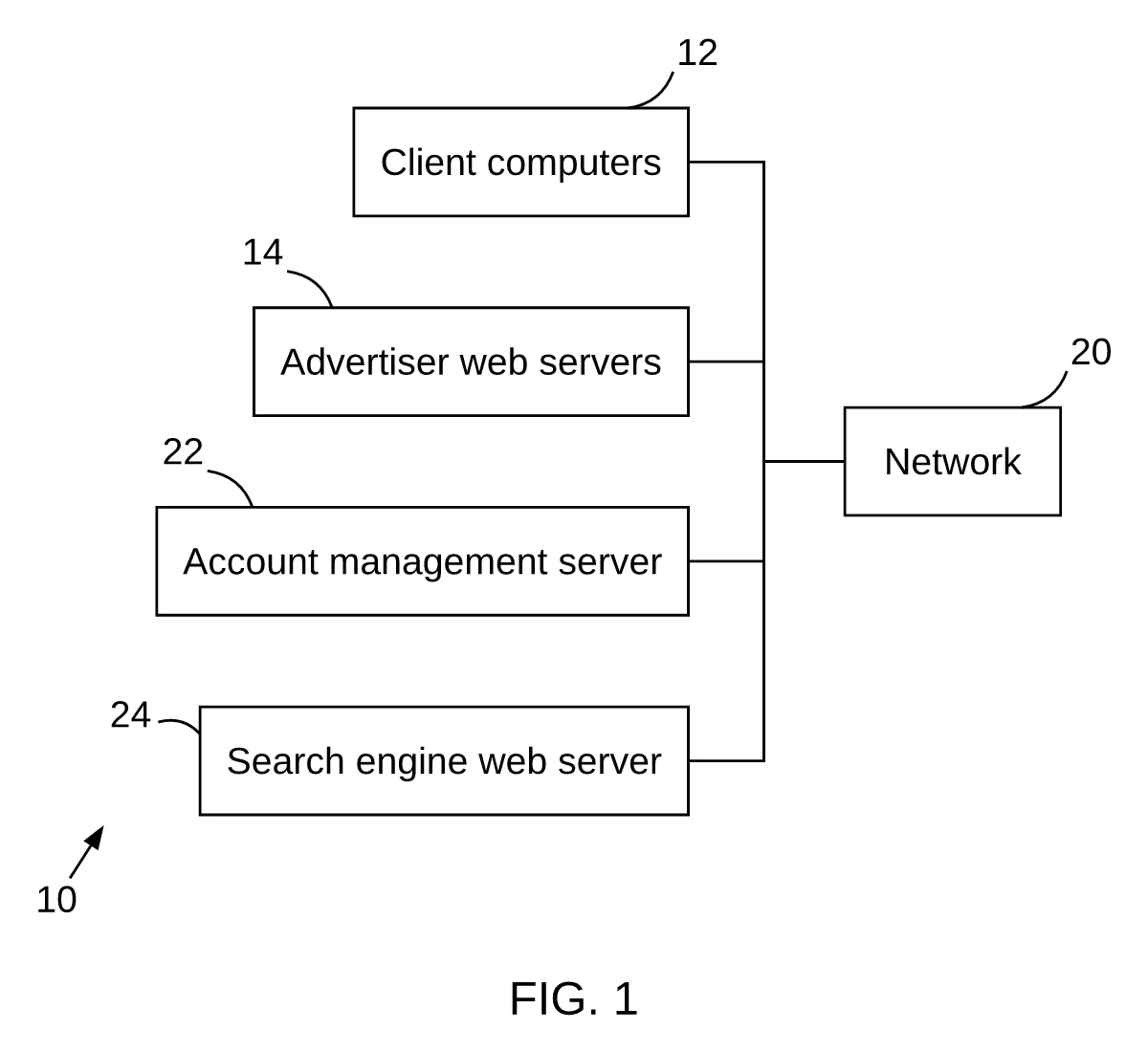
Distributed system with search engine and account management servers · US 6,269,361 B1, FIG. 1
1. Quoted source text (verbatim input)
The block diagram of FIG. 1 therefore shows a distributed system 10 comprising a plurality of client computers 12, a plurality of advertiser web servers 14, an account management server 22, and a search engine web server 24, all of which are connected to a network 20. The network 20 will be hereinafter generally referred to as the Internet. Although the system and method of the present invention is specifically useful for the Internet, it should be understood that the client computers 12, advertiser web servers 14, account management server 22, and search engine web server 24 may be connected together through one of a number of different types of networks. Such networks may include local area networks (LANs), other wide area networks (WANs), and regional networks accessed over telephone lines, such as commercial information services. The client and server processes may even comprise different programs executing simultaneously on a single computer.
The client computers 12 can be conventional personal computers (PCs), workstations, or computer systems of any other size. Each client 12 typically includes one or more processors, memories, input/output devices, and a network interface, such as a conventional modem. The advertiser web servers 14, account management server 22, and the search engine web server 24 can be similarly configured. However, advertiser web servers 14, account management server 22, and search engine web server 24 may each include many computers connected by a separate private network. In fact, the network 20 may include hundreds of thousands of individual networks of computers.
US 6,269,361 B1, detailed description, two contiguous paragraphs describing the distributed system of FIG. 1
2. Generated by PatentQuill
3. Editing and export
Click a box to change its words; only that box moves. Export PDF, SVG or PNG.
The exported sheet carries the same drawing shown in column 2. The samples on this page are shown as generated, with no edits.
Source: US 6,269,361 B1, FIG. 1. US 6,269,361 B1, detailed description, two contiguous paragraphs describing the distributed system of FIG. 1. Generated by PatentQuill from the quoted public patent text; unedited.
Sheet check: all 12 rules passed (37 CFR 1.84 measurable rules).
How it differs from the official figure: The official FIG. 1 also shows a browser 16 on each client computer and storage 32 in the account management server, which this passage mentions only in general terms; the generated figure omits them and draws the four computer groups connected to network 20. The reference numeral 10 labels the whole system and is drawn as an arrow in the official figure. Cross-check found no issues. Compliance checks all passed.
Questions
What is a patent block diagram?
A figure that shows the parts of a system as boxes and the connections between them, numbered so the description can refer to each part. It is the usual figure for apparatus and system claims, and often appears as FIG. 1 ahead of a method flowchart.
Should the numerals sit inside or outside the box?
For block diagrams, outside on a short lead line so the numeral does not compete with the label. Flowchart steps are the other way round, with the numeral inside the box.
Will it add modules my description does not contain?
It should not, and it tells you when it does. Every box is tied to a source sentence. When your text gives no numeral, the engine assigns one and the cross-check lists it; anything not found in your text is flagged. You can fix or remove anything flagged before export.
What can I try for free?
5 free credits when you sign in with Google, with the full editor and numeral check. Free exports carry a watermark; paid credits export clean sheets without a watermark and a cross-check report. Paid drawings start from $0.33 per drawing — see pricing.
Are the drawings accepted by the USPTO?
Sheets are produced to the measurable requirements of 37 CFR 1.84 (margins, letter height, black solid lines, figure labels, sheet numbers) and checked before export. Acceptance also depends on content, such as showing every claimed element, which stays your call.
The free patent drawing checker measures margins, letter height, FIG. labels and sheet numbers on the sheets you plan to file. More on the home page. If you are weighing tools, the patent drawing software comparison covers dedicated drafting apps; for outsourced rates, see patent drawing cost.
Draw the system figure
Paste a system description and export a first sheet. 5 free credits when you sign in with Google.