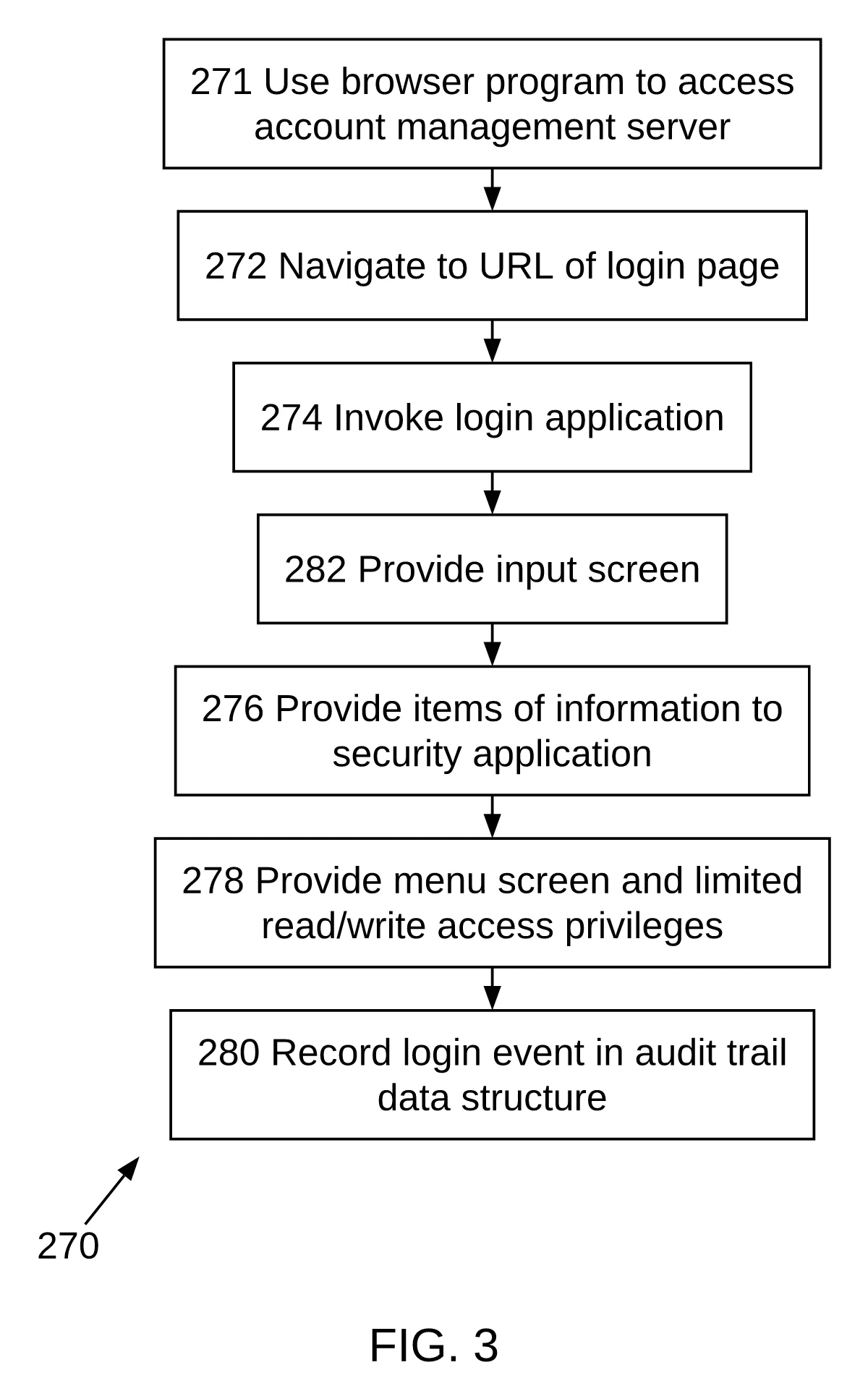

Reference numerals in patent drawings
A working method for inventors and paralegal staff: one numeral list, lead lines the rule asks for, and a two-way check between the description and every sheet before filing.
By Zane · Published
Quick answer
A reference numeral — also called a reference number or reference character — is the number or letter that ties a part or step in a drawing to the same part or step in the description. 37 CFR 1.84(p)(4) requires one numeral per part wherever it appears and never one numeral for two parts, and 1.84(p)(5) requires the two lists to match in both directions. The 100 series, a new hundred for each figure and S100 step numbers are drafting conventions, not rule text: choose one and keep it.
What 37 CFR 1.84 requires
Six places in 1.84 govern reference characters and the numbers around them. Read them as one system: the numeral identifies a part, the lead line connects it to that part, and the description must use the same numeral.
§ 1.84(p)(4)
One part, one numeral.
“The same part of an invention appearing in more than one view of the drawing must always be designated by the same reference character, and the same reference character must never be used to designate different parts.” A part that appears in FIG. 1 and FIG. 3 keeps its numeral in both views, and no other part may borrow it.
§ 1.84(p)(5)
The two lists match in both directions.
“Reference characters not mentioned in the description shall not appear in the drawings. Reference characters mentioned in the description must appear in the drawings.” This is the clause that makes numbering a two-way check, not a one-way label.
§ 1.84(q)
Lead lines point from the numeral to the part.
Lead lines “may be straight or curved and should be as short as possible,” must not cross each other, and must be drawn like every other line (1.84(l)). They are required for each reference character except one that marks a surface or cross section; that character must be underlined so the missing line is not mistaken for an error.
§ 1.84(p)(1)
The numeral is plain and upright.
Reference characters, sheet numbers and view numbers “must be plain and legible, and must not be used in association with brackets or inverted commas, or enclosed within outlines, e.g., encircled.” They are oriented in the same direction as the view. Numerals are preferred, but letters are allowed with the English alphabet under 1.84(p)(2).
§ 1.84(p)(3)
The numeral is large enough and clear of the drawing.
Numbers, letters and reference characters must measure at least .32 cm (1/8 inch) in height on the printed sheet. They should not cross or mingle with the lines, and should not be placed on hatched or shaded surfaces.
§ 1.84(t), (u)(2)
Other numbers stay visibly different.
Sheet numbers must be “larger than the numbers used as reference characters to avoid confusion,” and view numbers must also be larger than reference characters. That is what keeps a reference numeral 100 from being read as a figure number or as part of a sheet number such as “1/3.”
The quoted language is from 37 CFR 1.84. The rule fixes form and consistency; it does not fix the numbering scheme itself.
Build a numbering plan before you draw
Numbering problems are easier to prevent than to find after export. The five steps below put the list first, so the drawing has something definite to agree with. Steps 1 and 3 are drafting practice; steps 2, 4 and 5 are where the rule applies.
Write the numeral list before the drawing
ConventionRead the description and write down every part and every method step that will need a numeral, in the order the description introduces them. The list — sometimes called a reference numeral register — is the document the drawing has to agree with. This is drafting practice; 1.84 does not require a separate list.
Give each part exactly one numeral
RuleA numeral may name one part only, and a part keeps the same numeral in every view where it appears. Do not restart a number for a different part in a later figure. This is the direct requirement of 1.84(p)(4).
Choose a series and write it down
ConventionThe 100 series for system parts, a new hundred for each figure, S100 for method steps and even increments are conventions. The rule text names no series, no starting number and no increment. What matters under 1.84(p)(1) is that each character is plain and legible, and under (p)(4) and (p)(5) that it is used consistently and appears on both sides.
Put the numeral where the rule puts it
RuleFor a part, draw a short lead line from the numeral to the feature (1.84(q)); keep it straight or curved, as short as possible, and never crossing another lead line. In PatentQuill flowcharts the step numeral is printed at the start of the box label. 1.84(p)(1) says reference characters must not be “enclosed within outlines, e.g., encircled”; the rule does not say how that applies to a numeral inside a flowchart box, so some drafters use a short lead line for step numerals instead. Confirm the choice with your attorney.
Reconcile the list and the sheets after every edit
RuleA numeral added to the text needs a place on a sheet (“must appear”), and a numeral removed from the text must come off the sheet (“shall not appear”). Run the check after each change, not once at the end; an edit to one figure often changes a numeral another figure shares.
| What you number | Usual convention | Example | Status and source |
|---|---|---|---|
| A part in the first figure | 100 series, often in even steps | 100, 102, 104 | ConventionThe numbers themselves are not in the rule; 1.84(p)(1), (p)(4) and (p)(5) govern their form and consistency. |
| A part in a later figure | A new hundred for the figure | 200, 202, 204 | ConventionUseful because it keeps one figure’s parts visually together. The rule does not require it. |
| A method step | S series, or the same hundred series as parts | S100, S102, S104 | ConventionWhatever prefix you use, the step number is the character that must match the description in both directions. |
| The numeral itself | Plain, upright, uncircled, at least .32 cm high | 102 | Rule — 1.84(p)(1), (p)(3)No brackets, inverted commas or enclosing outlines. |
| A part shown in another view | Exactly the same numeral | 102 in FIG. 1 and FIG. 3 | Rule — 1.84(p)(4)The same part never takes a second number, and the number never takes a second part. |
| A numeral the description never uses | Do not put it on the sheet | — | Rule — 1.84(p)(5)An orphan numeral is a defect even if it looks harmless in the corner of a figure. |
The convention rows are marked because they are not in the rule text. The rule does not forbid a simple 1, 2, 3 sequence, but the numerals still have to be plain, consistent and matched to the description; a drawing with a neat 100 series can still fail 1.84(p)(5).
Three number sequences, three jobs
A patent sheet can carry three kinds of number at once. Keeping them apart is part of keeping the numerals readable, and 1.84 gives each sequence its own paragraph.
- Reference numerals identify parts or steps: 100, 102, S100. The two-way match in 1.84(p)(4) and (p)(5) applies to these.
- View numbers identify figures: FIG. 1, FIG. 2. Under 1.84(u)(1) they run in consecutive Arabic numerals from 1, independent of the sheet numbering, and 1.84(u)(2) requires them to be larger than the reference numerals.
- Sheet numbers identify pages: 1/3, 2/3. Under 1.84(t) they run in consecutive Arabic numerals within the sight, with the sheet number and the total either side of an oblique line, and they must be larger than the reference numerals.
The practical consequence is simple: do not let a reference numeral stand in for a figure number, and do not number a part “1/3.” A reader who sees 100 on a block diagram should be able to assume it names a part because the figure and sheet numbers are visibly larger and in their own places.
Checklist: five ways reference numbering goes wrong
These are the five shapes a numbering error takes in practice. Each entry says how to find it on paper, then what the PatentQuill numeral cross-check reports for that shape.
In the description, missing from the drawing
How to find it: Take the numeral list and tick each number on every sheet. Anything left unticked is either a part that needs a view or a numeral the description should not carry.
In PatentQuill: The cross-check reports it as a numeral used only in the text, and suggests adding the box when the text describes that part.
On the drawing, missing from the description
How to find it: Read each sheet on its own, number by number, and search the description for each one.
In PatentQuill: The cross-check reports it as a numeral found only on the drawing and asks you to confirm or remove it.
One numeral, two different parts
How to find it: Sort the numerals on the sheet. When one repeats, ask whether the two labels name the same part in another view. If they do not, one of the two boxes is wrong.
In PatentQuill: The cross-check reports a duplicate numeral and names every box that carries it.
One numeral, two different names
How to find it: Put the sentence that introduces the numeral beside the label on the box. If the nouns differ — processor in the text, controller on the sheet — one side has drifted.
In PatentQuill: The cross-check reports a name mismatch between the text name and the drawing label for that numeral.
One part, two different numerals
How to find it: Group the list by part name, not by number. A part with two entries is the tell. It is the hardest form to see on the sheet because each number looks correct by itself.
In PatentQuill: The cross-check catches it when one of the two numbers is missing from the other side; when both numbers appear in both places for the same part, it has no anchor and the register is still your job.
The cross-check runs in the editor on the specification text you paste and the boxes PatentQuill drew from it. It extracts the numerals in that text — plain numerals, suffixes such as 104a and S-prefixed step numbers such as S302 — and compares that set with the numerals on the boxes, in both directions. A numbering finding names the numeral, quotes the boxes that carry it, and where it can offers a renumber, rename or add-box action to apply.
Two limits matter. It does not read a filed PDF or the drawings of another program, and it cannot decide which of two conflicting numbers is the one you meant. The list in your description remains the source of truth. The free drawing checker is a separate, narrower check: on a PDF sheet it lists numerals that repeat, with no description to compare against.
You get 5 free credits (about 1–2 complete drawings) when you sign in with Google, and editing does not use a drawing credit.
What PatentQuill does not do
Choose your numbering scheme
The series, the starting number and the increment are choices you and your description make. PatentQuill can renumber a box on the drawing when the check finds a conflict; it does not rewrite the specification, and it does not decide which number is legally preferable.
Read a filed PDF for you
The editor’s numeral cross-check compares the text you pasted with the figures it drew. It does not extract numerals from a PDF you already filed or from drawings made in another program. The free checker reads a PDF sheet and lists repeated numerals, but it has no description to compare against.
Mechanical, structural, electrical or design drawings
PatentQuill draws method flowcharts and system block diagrams for US utility applications. It does not draw part geometry, section views, ornamental design or machine components; a patent draftsperson or CAD is the right tool for those.
Drawings for other patent offices
The numbering rules here are the USPTO rules in 37 CFR 1.84. PatentQuill does not prepare PCT, EPO, UK or other national formats, and this article does not compare them.
A guarantee that the USPTO will accept the sheet
The checks cover what can be measured: the numerals on the sheet, the labels, the margins, the letter height and the black lines. Whether a figure shows every claimed feature, and how an examiner reads it, remain separate questions. Acceptance is the Office’s decision.
Legal advice
PatentQuill is a drafting tool, not a law firm. It does not review claims, advise on patentability or replace your attorney.
Rule text: 37 CFR 1.84 — Standards for drawings — Electronic Code of Federal Regulations; and MPEP 608.02 — Drawing — USPTO Manual of Patent Examining Procedure. Checked 2026-11. This article is not legal advice; check every numeral against the official sources before you file.
Questions
Do reference numerals have to be numbers?
Can one numeral name different parts in different figures?
Do the numbers in the description have to match the drawing exactly?
Does every reference numeral need a lead line?
How can I check numbering on a PDF I already exported?
Bottom line
Build one numeral list, keep one numeral per part and one part per numeral, and reconcile it with every sheet in both directions before you file. The free patent drawing checker lists numerals repeated on a PDF you already have; the 37 CFR 1.84 checklist covers the rest of the sheet. Neither replaces a read of the description against the drawing.
PatentQuill is a drafting tool, not a law firm, and this article is not legal advice. It explains drafting practice for 37 CFR 1.84 drawings and does not replace the rule text, MPEP 608.02 or advice from your attorney. Confirm every figure against the official sources before you file.